Did you know a technology from the 1950s can help you understand how people search—and uncover opportunities to make your website more visible in AI-powered search?
It’s not a computer the size of your house. Nor is it a martini shaker to help you cope with the existential crisis of trying to get AI to notice your website.
Instead, it's regex, or regular expressions. Combined with Google Search Console, it can help you identify the questions people are already asking—and uncover opportunities to create content that's more useful for both traditional and AI-powered search.
If you’ve used Google Analytics or other similar tools for any amount of time, you’re probably familiar with regex. But you probably didn’t know that it had its start in the 1950s when mathematician Stephen Kleene developed regular expressions as a way to describe patterns in sequences of symbols.
How does regex work?
Let’s use an example in Google Search Console to explain.
Example: Find searches that begin with "how"
^how
What does it mean?
^: Tells Google to look at the beginning of a search query.
how: Tells Google to find searches that start with the letters how.
What would the results look like?
How does a centrifuge work
How do I choose a vendor
How to build a website
Why is this useful?
Instead of manually reviewing hundreds or thousands of search queries, you can use regex to instantly identify the questions people are asking. For example, if you discover that hundreds of people are searching for "how does a centrifuge work," you might create a blog post that answers that question. That content could help your website appear in traditional Google results and potentially be referenced by AI-powered search tools.
One small improvement: Use ^how\b instead of ^how to match the complete word "how" rather than words that merely start with those letters, such as "however."
The key takeaway is that regex doesn't create or change your content. It simply helps you find patterns in your existing search data so you can make better SEO decisions.
Here's a more advanced example that shows how regex can identify longer, more conversational searches in Google Search Console.
Example: Find searches containing 8 or more words
REGEX EXPRESSION
^(?:\S+\s+){7,}\S+$
What does each part mean?
^: Start at the beginning of the search query.
(?: ... ): Group a pattern together so it can be repeated.
\S+: Match one or more non-space characters (essentially a word).
\s+: Match one or more spaces between words.
{7,}: Repeat the grouped word-and-space pattern at least 7 times.
\S+$: Match the final word and make sure the query ends there.
Here are some of the most common symbols you can use in regex and what they mean:
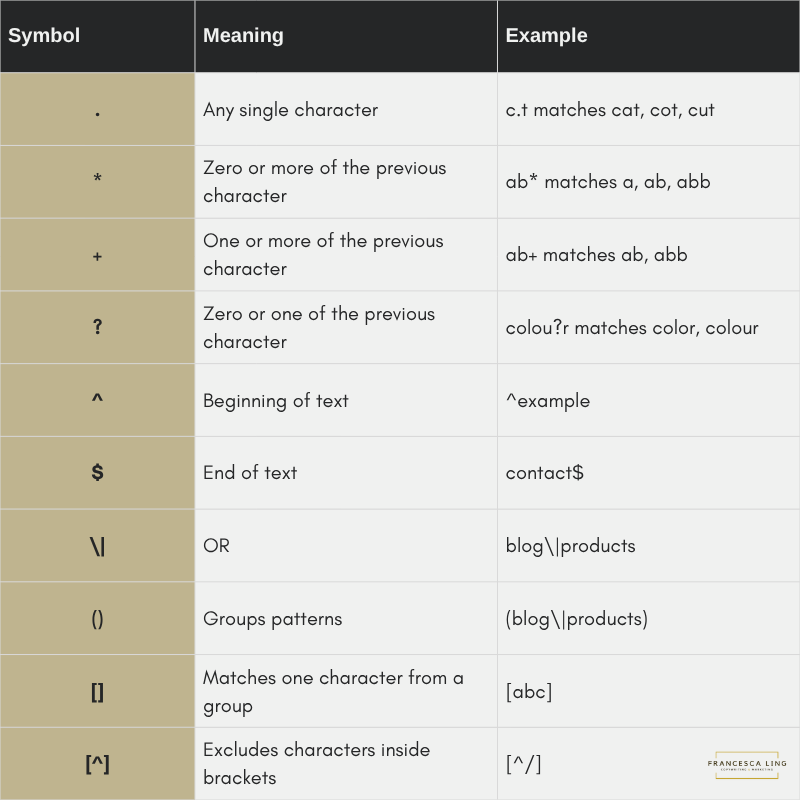
Why is regex in Google Search Console useful for AI visibility?
Longer searches often contain more context and specific questions. For example, someone searching for "centrifuge" might simply be browsing, while someone asking "what is the best centrifuge for processing blood samples" has a much clearer information need.
By identifying these detailed searches, you can find opportunities to create content that directly addresses what people want to know. This can make your website more useful for traditional SEO and potentially more relevant to AI-powered search experiences.
Using Regex + Google Search Console
Now let's put this into practice. Open Google Search Console, select your website, and navigate to Performance → Search results in the left-hand sidebar. Choose your preferred date range, then click + Add filter.
Then select “Query”.
Keep in mind: Google Search Console only shows queries where your website appeared in Google Search results. It doesn't show every search people make, or the prompts they enter into AI tools like ChatGPT.
From there, select “Custom (regex)” from the dropdown:
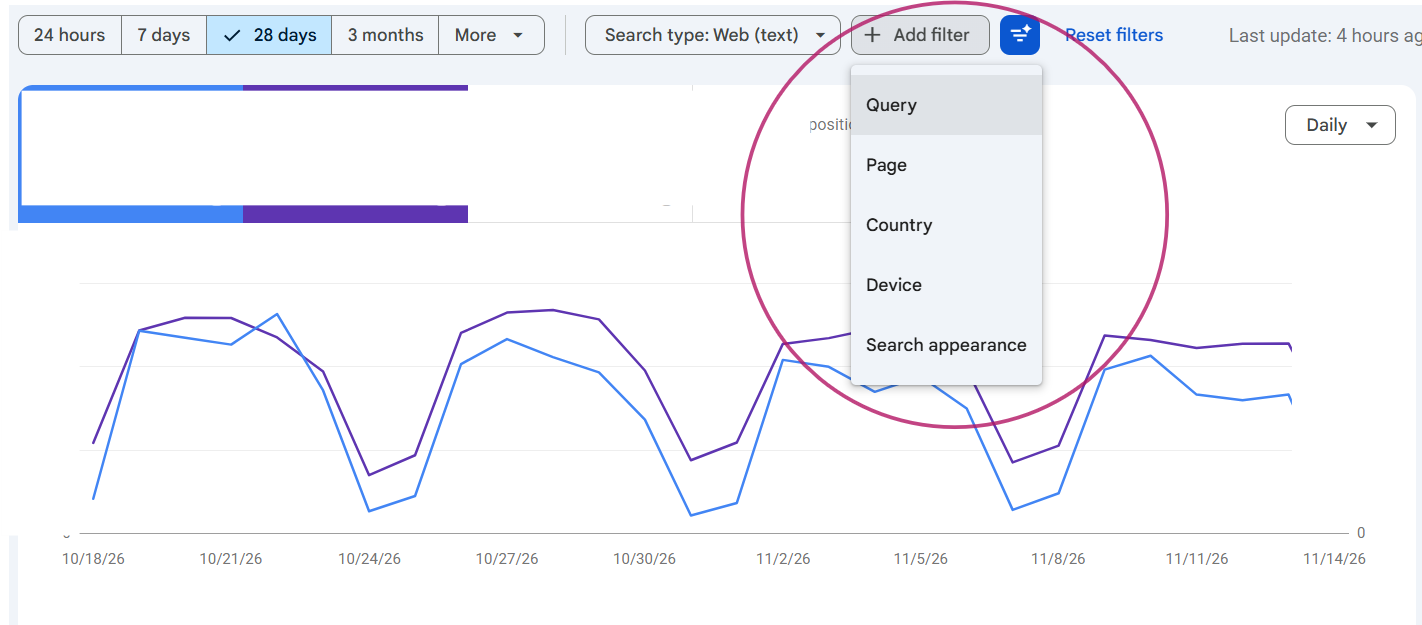
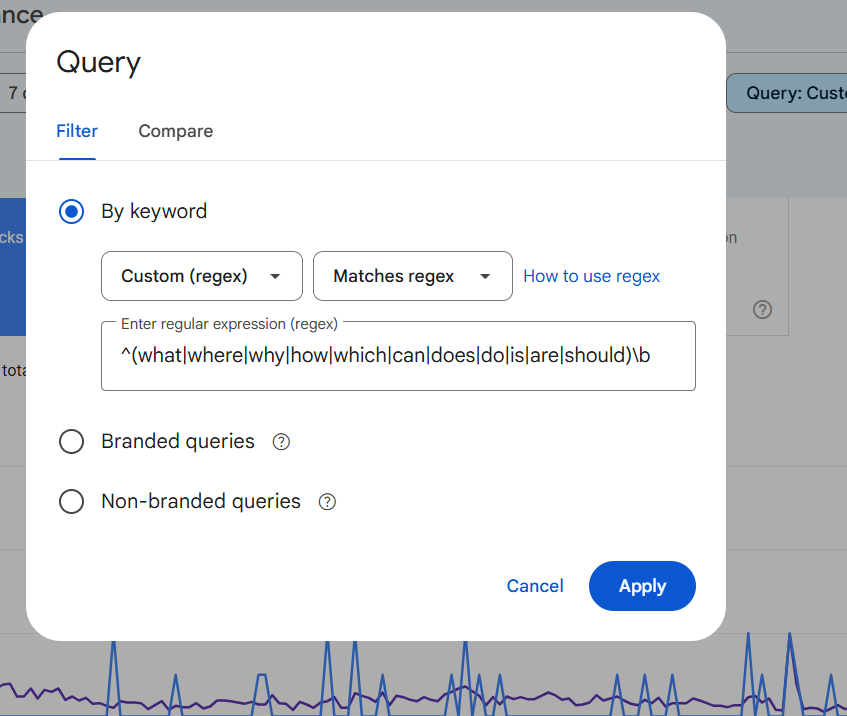
Add your regex and click Apply. In this case, our regex is:
^(what|where|why|how|which|can|does|do|is|are|should)\b
In other words, we're filtering for queries that begin with common question words.
This is how it will look once you add it in.
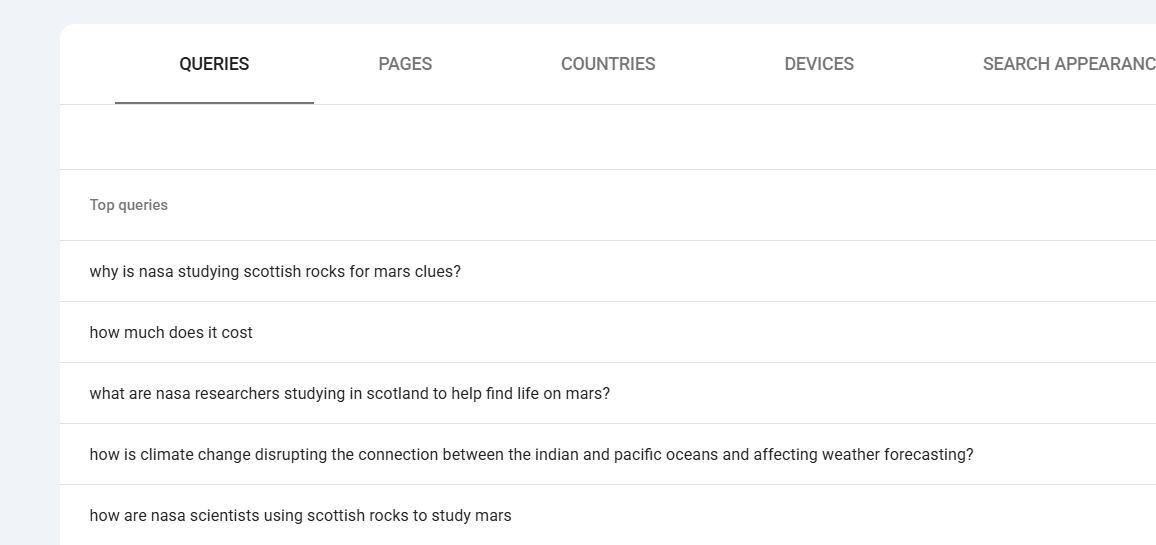
And then as you scroll down, you can see the queries that begin with common question starters.
Next, click the Pages tab to see which URLs are appearing in Google for these searches. You can select a page to narrow the report and then return to the Queries tab to see which searches are associated with that specific URL.
What can we do with this information?
Let’s say you discover that your website appears in Google for "how much does a new car cost," but the page doesn't actually explain pricing. That's an opportunity to add a section covering typical costs, factors that affect pricing, and what buyers should consider before purchasing. You're not simply adding keywords; you're answering a question your audience is already asking.
Look for queries with meaningful impressions, low CTR, and rankings that suggest room for improvement. Prioritize those that are relevant to your audience and match the purpose of the page.
And yes, this sounds a lot like SEO. That's because it is. The same qualities that make content valuable in traditional search, relevance, clarity, depth, and usefulness, can also help AI systems understand and reference it. And who doesn't want more traffic from Google and AI?
While great content doesn't guarantee an AI citation, it gives you a stronger foundation for visibility across both.
Let’s make it even more relevant for AI
Think about how you interact with a chatbot. You're probably more likely to ask a complete question than type in a handful of keywords.
Maybe you ask, "How do I choose the right software for my business?" instead of simply searching for "business software."
These longer, more conversational questions can reveal what someone actually wants to accomplish. And while Google Search Console doesn't show us what people are typing into ChatGPT, we can use regex to find similar patterns in Google searches.
Your questions might look something like this:
How do I _______
Suggest ________
Fix / solve / troubleshoot __________
Explain ____________
And so on. You can use regex to filter by these types of queries too.
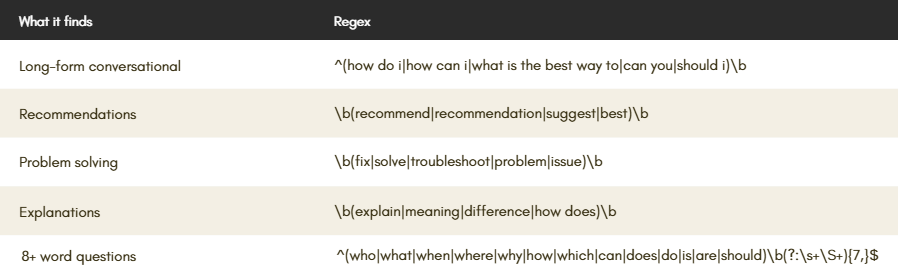
People also tend to ask longer questions when using AI tools. Similar to how you would talk to a friend instead of into a search engine. Naturally, there's a regex you can apply for these exact situations.
Here’s how to build regex based on number of words:
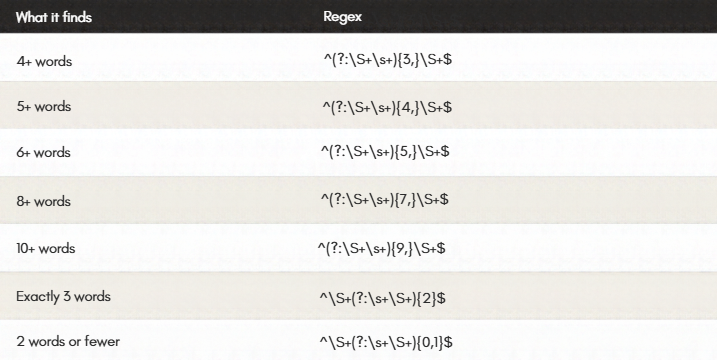
However, there's an important distinction: a six-word query isn't automatically an AI search query. It's a useful signal that can help you understand whether your content is positioned to answer the kinds of detailed questions people increasingly ask search engines and AI assistants.
I have my data. Now what?
Look for pages and queries with meaningful impressions, low click-through rates (CTR), and average positions that suggest room for improvement. These can be valuable opportunities, particularly when the queries are relevant to your audience and the page's purpose.
Start with the queries that have meaningful impressions, room for improvement in their rankings or CTR, and a clear connection to the page's purpose. Make sure the page answers those questions directly, ideally near the beginning of the content when it makes sense. Then look at other relevant queries and incorporate their answers naturally throughout the page.
While you are editing, take a minute to look at the page generally. Does it have an original and clear point of view? Does it add useful information for a reader? Is the content interesting, engaging, and well-organized?
Make note of when you made the changes and what changes you made. I personally like to make my edits in “suggesting” mode in Google Docs. Then, I’ll duplicate this document and accept my changes in the new version.
This way you can keep track of the changes you made; and even revert the content back to a previous version if you’re not happy with the impact on your performance.
To summarize, you will need to:
Find opportunities: Look for relevant queries with meaningful impressions, low CTR, and average positions where improvement is realistic.
Evaluate the page: Determine whether the existing content answers the query clearly and completely.
Improve the content: Add a direct answer, useful context, examples, comparisons, or supporting evidence where appropriate.
Measure changes: Record the date of your updates, then compare impressions, clicks, CTR, and average position over time. Look for improvements in the queries you targeted, while accounting for seasonality and other ranking changes.
Remember, improved Google Search performance doesn't necessarily mean your content is being cited more frequently by AI tools.
Free download: regex cheat sheet for AI
If you are feeling excited by the possibility of finding new keyword opportunities for AI, but queasy about writing your own regex, I hear you.
That’s why I put together a free 4-page GSC Regex Cheat Sheet you can copy and paste straight into Google Search Console. Inside, you’ll find ready-to-use filters for:
Long-tail queries (sorted by exact and minimum word counts)
Question-based and conversational searches (queries that resemble how people interact with AI tools)
Commercial & purchasing intent (high-value buying signals)
Brand vs. non-brand traffic
Page-level & combination filters (to isolate specific directories and patterns)
[Download the Free Regex Cheat Sheet →] (instant access)
P.S. Want help turning your Search Console data into a full AI visibility plan? Skip the guesswork—book a 15-min intro call or email me at hello@francesca-ling.com.