Project Management 101: No Software, No Problem
You don’t need expensive software or a complicated platform to manage a project successfully. When you are first starting out as a freelancer, many companies may be tentative to add you as a user to their internal tools. Or they may not have them in place at all. Does that mean you won’t be able to meet deadlines and you might as well throw your phone into the Atlantic Ocean.
Absolutely not. Today I’m going to tell you how.
The key is to have a clear understanding of what needs to get done, who is responsible for each task, when it needs to be completed, and how everyone will stay informed.
Here’s how to build a project management system that works without dedicated project management software.
1. Start With a Clear Project Plan
Before you start assigning tasks (even if they are just to yourself) or setting deadlines, define what the project needs to accomplish.
A project plan doesn’t have to be a lengthy document. A simple outline can help everyone understand the purpose, scope, and expected outcome. If you would like a copy of my creative brief template, you can find it here. This is a great way to get started thinking about everything you might need created for your campaign.
As you fill it out, keep the following in mind:
What is the goal? Define what success looks like.
What needs to be delivered? List the main deliverables or outcomes.
What is the deadline? Establish the final due date and any important milestones.
Who is involved? Identify the people responsible for completing the work.
What are the constraints? Consider budget, available resources, dependencies, and potential obstacles.
For example, if you’re launching a new website, your deliverables might include finalized copy, approved designs, completed development, quality assurance testing, and the launch itself.
Breaking the project into clear deliverables gives you a starting point for organizing the work.
2. Use a Spreadsheet as Your Central Task Tracker
A spreadsheet can serve as a surprisingly effective project management tool. Google Sheets is my go-to as you don’t get stuck in a situation where someone updates something, has to update the name, and then there’s a million different versions to track.
Create a master task tracker with columns for:
Task: What needs to be done?
Owner: Who is responsible?
Start date: When should work begin?
Due date: When must the task be completed?
Status: Not started, in progress, blocked, or complete.
Priority: High, medium, or low.
Dependencies: What needs to happen before this task can begin?
Notes or links: Where can team members find relevant information?
Here’s an example:
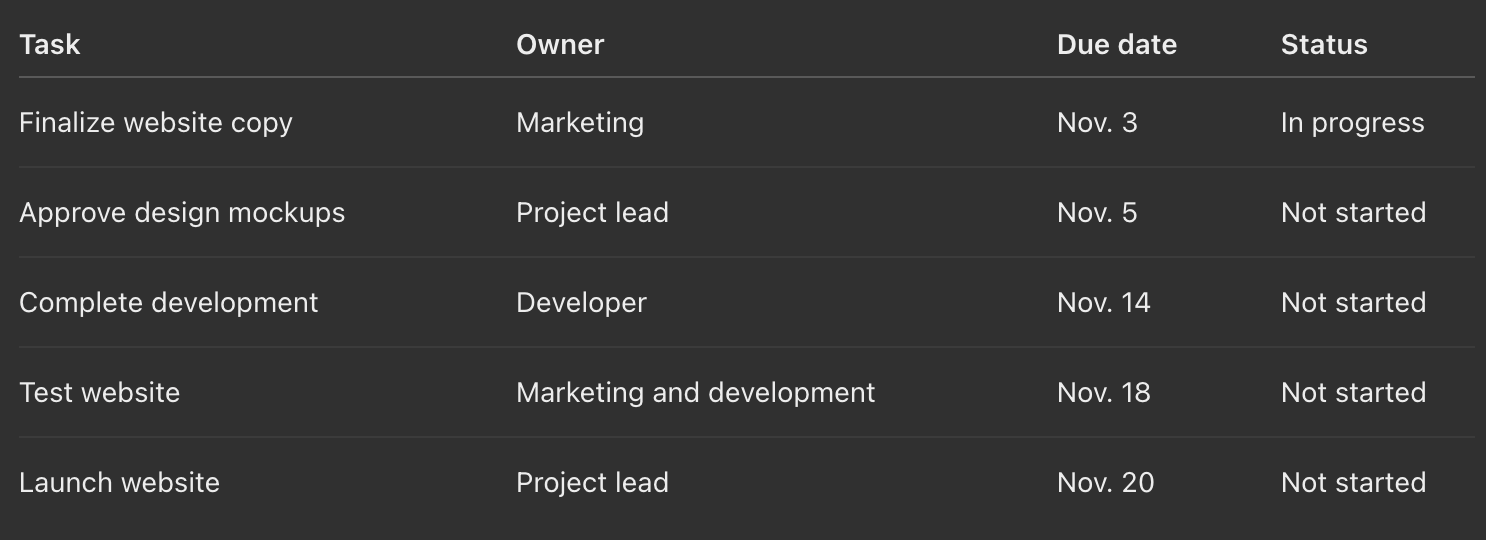
The dates above are illustrative, but the structure is what matters.
Keep one master tracker as the source of truth. If task updates are scattered across emails, chat messages, and separate documents, it becomes difficult to determine which information is current.
You can still use other tools to communicate, but the master tracker should always reflect the latest status.
3. Break Large Tasks Into Smaller Actions
One of the easiest ways for a project to get off track is to create tasks that are too broad.
A task like "Launch marketing campaign" doesn't tell anyone what needs to happen next. It could involve writing copy, designing creative assets, preparing email lists, setting up tracking, and scheduling promotional content. Instead, your actions should be SMART, meaning:
Specific
Measurable
Attainable
Relevant
Timely
Break large tasks into smaller, actionable steps.
For example:
Instead of: Launch marketing campaign
Create individual tasks:
Define campaign objectives.
Research the target audience.
Draft email and advertising copy.
Design campaign assets.
Obtain stakeholder approval.
Set up campaign tracking.
Schedule launch.
Review initial performance.
Each task should have a clear owner and a realistic deadline.
A useful rule of thumb: if a task is difficult to estimate, assign, or report on, it may need to be broken down further.
Smaller tasks make progress easier to measure and help identify bottlenecks before they become major problems.
4. Create a Realistic Timeline
A project deadline is only useful if the work leading up to it is scheduled realistically.
Start with the final deadline and work backward. Identify the major milestones, then determine how much time each deliverable requires.
Pay particular attention to dependencies. For example, a designer may not be able to finalize a layout until the copy has been approved. Similarly, a developer may need approved designs before beginning implementation.
Build these relationships into your timeline so that one delayed task doesn't unexpectedly derail the entire project.
You can create a basic timeline using a spreadsheet, a shared calendar, or even a simple document.
For projects with multiple milestones, consider using a basic Gantt chart. This is a visual timeline showing tasks, durations, and overlapping work. You can create one in Excel or Google Sheets without specialized project management software.
Remember to leave some buffer time for revisions, unexpected issues, and approvals. A schedule that assumes everything will go perfectly is likely to fall behind.
5. Establish Clear Ownership and Accountability
When multiple people are involved, it's easy for tasks to fall through the cracks because everyone assumes someone else is handling them.
Every task should have one clearly identified owner who is responsible for making sure it gets completed.
That doesn't mean only one person can work on a task. Several people may contribute, but one person should be accountable for its progress. This is particularly important if you are working as a freelancer.
It's also important to distinguish between the person doing the work and the person approving it. For example, a writer may draft a blog post, while a marketing manager reviews and approves the final version. This is why it’s crucial to keep include these people in your planning from the start.
Clarifying these roles early prevents confusion and reduces unnecessary back-and-forth.
For larger projects, you can use a simple responsibility matrix to document who is responsible for doing the work, who approves decisions, and who needs to be consulted or informed.
6. Set a Regular Communication Schedule
Without project management software, communication becomes especially important. But that doesn't mean you need to schedule meetings for every update.
Establish a consistent process for sharing progress and addressing problems.
Depending on the size and complexity of the project, this could include:
Weekly status updates: Each task owner reports what they've completed, what they're working on, and whether anything is at risk.
Short project meetings: Discuss decisions, dependencies, and obstacles that require input from others.
Milestone reviews: Confirm that key deliverables meet expectations before moving to the next phase.
Deadline reminders: Use calendar invitations or email reminders to keep upcoming due dates visible.
Keep status updates focused. Instead of asking everyone to explain everything they've done, ask three simple questions:
What has been completed since the last update?
What needs to happen next?
Is anything blocked or at risk of missing its deadline?
These questions provide a quick picture of project health without creating unnecessary administrative work.
For smaller teams, a shared document or email thread may be enough. For more complex projects, a recurring meeting can help keep everyone aligned.
7. Keep Project Documents Organized
Project management involves more than tracking tasks. It also means keeping the documents, decisions, and resources needed to complete those tasks easy to find.
Create a dedicated folder for each project in Google Drive, Microsoft OneDrive, Dropbox, or your organization's existing file storage system.
Organize it into logical sections, such as:
Project brief and planning documents
Research and reference materials
Working files and drafts
Approvals and final deliverables
Meeting notes and status reports
Use consistent file naming conventions so that team members can identify the correct document quickly.
For example, a naming convention such as Website_Copy_Draft_2026-11-03 is more informative than Final_Copy_v3_NEW.
Whenever possible, share links to documents rather than attaching multiple versions to emails. This reduces confusion about which file is current.
It's also helpful to document important decisions, including what was decided, who approved it, and whether it affects the timeline or scope.
8. Track Changes and Manage Scope
Projects don't always go according to plan. Stakeholders may request additional features, priorities may shift, or new requirements may emerge.
These changes aren't necessarily a problem, but they need to be managed.
When someone requests a change, consider three things:
Time: Will the change affect the project deadline?
Resources: Will it require additional work or people?
Scope: Does it add something that wasn't included in the original plan?
For example, adding a new landing page to a website project may seem like a small request. However, it could require additional copywriting, design, development, testing, and approvals.
Before agreeing to the change, document its impact and determine whether another task needs to be delayed or removed.
A simple change log in your project spreadsheet can record the request, the date, the person requesting it, the decision, and any resulting adjustments.
This helps prevent scope creep, which occurs when a project gradually expands beyond its original objectives without corresponding adjustments to the schedule or resources.
9. Identify Problems Before They Become Delays
A project tracker should do more than show completed tasks. It should help you identify potential problems while there's still time to address them.
Review the project regularly for warning signs, such as:
Tasks that are past due.
Work that has been marked "in progress" for an unusually long time.
Deliverables waiting for approval.
Dependencies that haven't been completed.
Team members with too many competing priorities.
You don't need complicated reporting to identify these issues. A spreadsheet filter or conditional formatting can highlight overdue tasks and approaching deadlines.
When a task is blocked, document what is preventing progress, who needs to resolve the issue, and when it needs attention.
The goal isn't to monitor every minute of everyone's work. It's to make obstacles visible so the team can respond before they affect the entire project.
10. Close the Project and Review the Results
Once the final deliverable is complete, take time to formally close the project.
Confirm that all required work has been delivered, stakeholders have approved the results, and final files are stored in the appropriate location.
Then conduct a brief retrospective.
Ask the team:
What went well?
What caused delays or confusion?
Which processes were useful?
What would we do differently next time?
You can also compare the original timeline and objectives with the final results. Did the project finish on schedule? Were the goals achieved? Were there unexpected costs or resource constraints?
Documenting these lessons makes future projects easier to manage. Over time, you'll build a repeatable process that reflects what works best for your team.
Final Thoughts
Effective project management is less about the software you use and more about how you organize work, communicate expectations, and maintain accountability.
A clear project plan, a shared task tracker, realistic deadlines, defined ownership, and regular communication can take you surprisingly far without dedicated project management software.
Start simple. Create one central tracker, break the work into manageable tasks, and establish a routine for reviewing progress. Once those fundamentals are in place, you'll have a system that can support everything from a small internal initiative to a more complex, multi-person project.
The best project management system isn't necessarily the one with the most features. It's the one people consistently use.
Do you need help with an upcoming marketing project or campaign? Contact me.